Every instrument, on one screen.
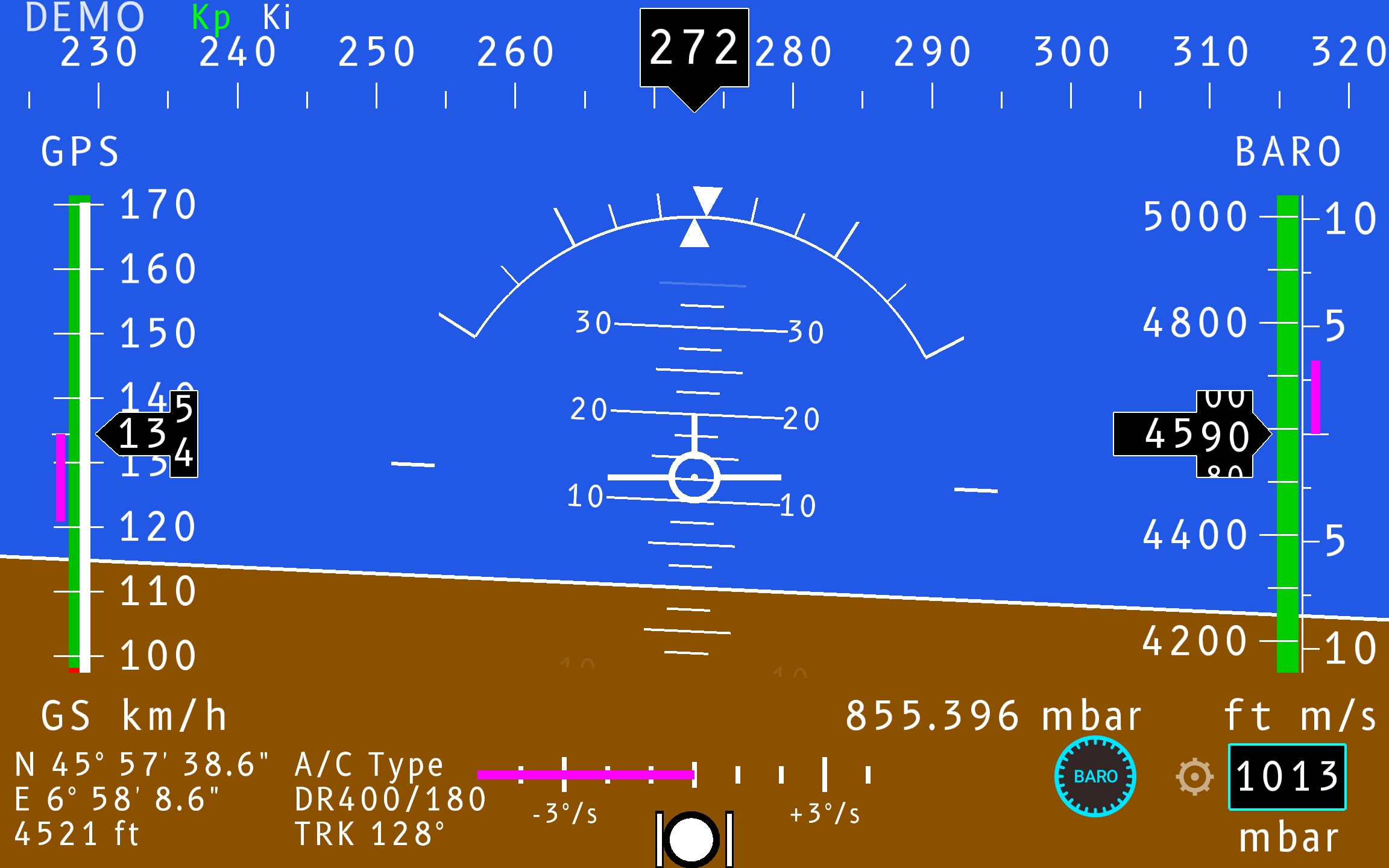
A Primary Flight Display consolidates the essential instruments of a light aircraft into a single picture. The artificial horizon splits the screen — sky above, ground below; speed runs down the left, altitude down the right, heading across the top, and supplementary data along the bottom.
 1
2
3
4
5
6
7
8
1
2
3
4
5
6
7
8
Eight zones.
Where everything sits.
| Top strip | heading / compass tape |
|---|---|
| Center | artificial horizon · pitch ladder · bank · aircraft symbol |
| Left tape | ground speed (GPS, km/h) |
| Right tape | altitude (ft) · vertical speed (m/s) |
| Bottom-left | position · GPS altitude · A/C type · ground track |
| Bottom-center | turn / slip · rate-of-turn scale |
| Bottom-right | auxiliary zone — QNH / pressure / configurable |
Attitude indicator.
The artificial horizon shows pitch and bank relative to the earth's horizon. The blue/brown boundary is the horizon line; a fixed aircraft symbol in the centre is the reference for reading both.
Pitch ladder
Horizontal bars at 10°, 20°, 30° above and below the horizon.
Bank scale
Arc with ticks at 10°, 20°, 30°, 45° and 60°; the pointer shows current bank.
Speed.
A vertical tape in km/h with the current value in the centre box. The magenta marker is a reference bug (e.g. a target or Vref).
Altitude & vertical speed.
Barometric altitude in feet, current value in the centre box, with a magenta target bug. A separate scale at the far right shows climb/descent rate.
Heading.
The compass tape runs across the top; the current magnetic heading is read under the central pointer, in 10° increments. Heading is fused from the IMU magnetometer.
Turn & slip.
The rate-of-turn scale is marked −3°/s and +3°/s, with a magenta bar for the current turn rate. The ball below is the slip/skid indicator — centred means coordinated flight.
Position & GPS.
| Latitude / longitude | from GPS fix |
|---|---|
| GPS altitude | ft (independent of baro) |
| A/C type | e.g. DR400/180 |
| Ground track (TRK) | °, true over the ground |
Auxiliary zone.
The configurable corner. By default it holds the altimeter setting (QNH) and
measured static pressure — set via the BARO knob, with 1013 mb
the standard (ISA) value — but it can be switched to other fields in Settings.
Windows and indicators.
Selectable windows
The bottom fields can show battery voltage, sound enable, or local time — chosen in Settings.
GPS vs baro altitude
GPS altitude is shown alongside barometric altitude as an independent cross-check.
Demo mode
A "DEMO" tag marks synthetic data. Filter gains (Kp, Ki) may be shown for tuning — hidden in normal flight.